



It works like a magic!
As a trader, I found this tool useful for spotting market trends and making informed decisions. The real-time data and clear chart patterns help identify potential trade opportunities.

INSTANT DOWNLOAD!
Your price: $12.00
Content: Expert: swing.ex4 V1.7 (Unlocked-Unlimited), Document: SwingTradeProV1.7.rtf.
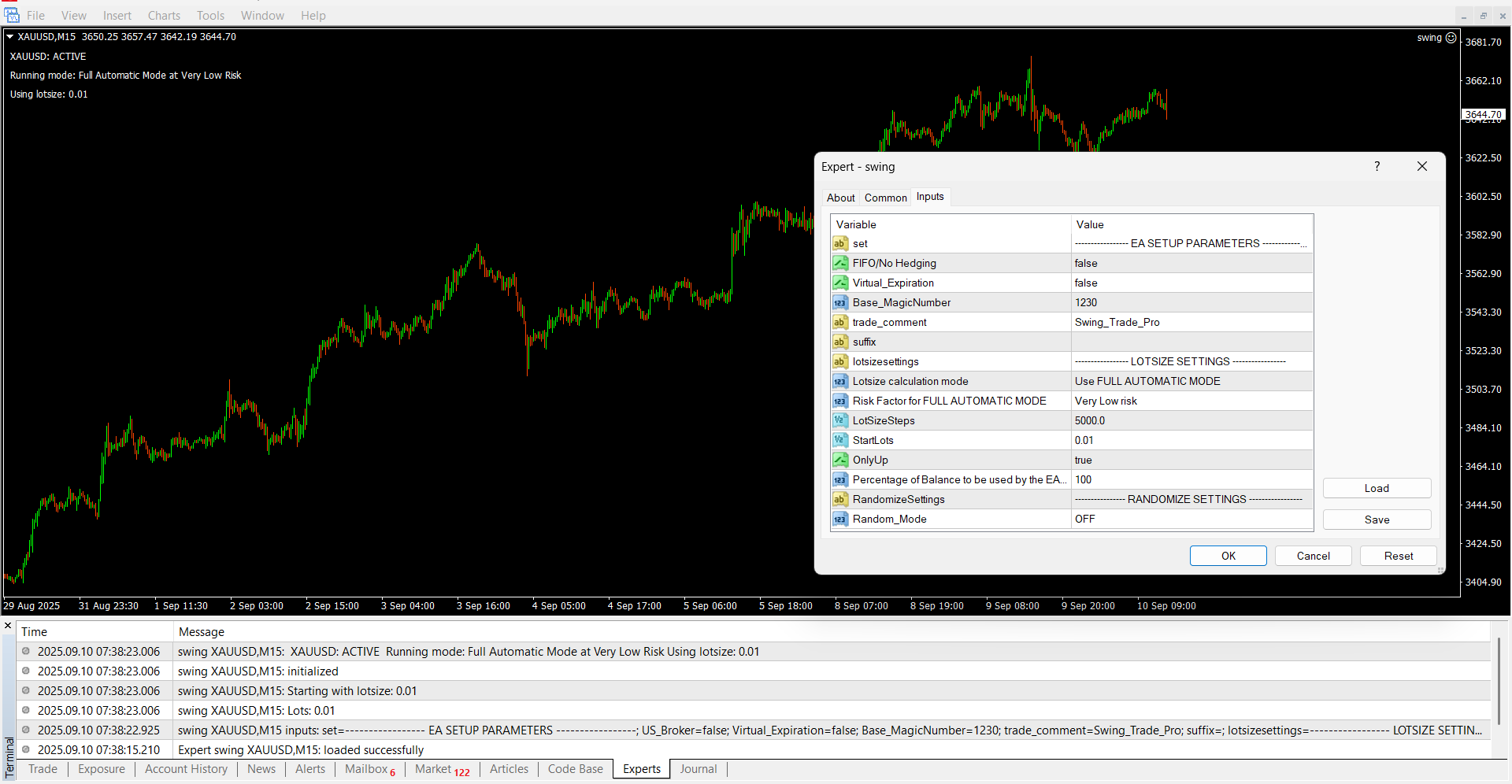
SWING TRADE PRO — Advanced Swing Trading EA
Swing Trade Pro is a powerful expert advisor designed to capitalize on volatility breakouts using precise price action analysis.
How It Works:
-
The EA scans four different timeframes simultaneously, looking for strong price movements and potential trend reversals.
-
It opens a maximum of one trade per timeframe, carefully managing risk with predefined stop loss (SL) and take profit (TP) levels.
-
Unique trade management features continuously monitor all open trades across timeframes, adjusting SL dynamically to secure profits and reduce risk.
-
No grid, martingale, or risky trading methods are used—only disciplined price action strategies.
Smart & Adaptive:
-
Plug-and-play setup makes it easy for anyone to start trading right away.
-
Automatically adapts to your account size, whether it’s $100 or $100,000, adjusting lot sizes and pair selections based on historical drawdown data.
-
Includes a randomization feature that tweaks trade parameters like SL and TP for each user to ensure unique trade patterns, preventing broker interference and enhancing robustness.
Best Suited For:
-
Currency pairs: EURUSD, GBPUSD, USDCHF, EURAUD, EURGBP, EURCAD, EURJPY, GBPJPY, USDJPY, USDCAD, AUDUSD, NZDUSD, AUDJPY
-
Gold (XAUUSD)
Key Features:
-
Easy setup — get started in minutes
-
Auto-adjusts to any account size and risk profile
-
Strict stop loss rules to minimize losses
-
Advanced trade management to improve stability and profits
-
Randomizes trades and settings for uniqueness
-
Supports up to 8 open trades per pair (max 4 per strategy)
-
Fully compatible with brokers having trade limits, FIFO, or no hedging rules
-
Works with all account types: ECN, STP, Cent, Standard
-
Not sensitive to spreads — reliable in different market conditions
-
Avoids dangerous grid and martingale systems
EA Parameter List and Setup Guide
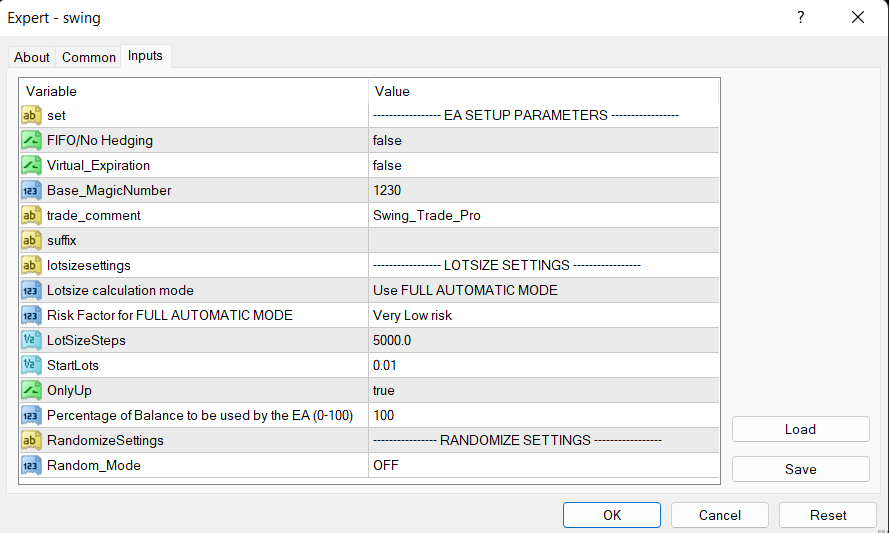
General Parameters
-
FIFO/No Hedging
Enable this if your broker enforces FIFO (First In, First Out) rules and does not allow hedging.
Default: false -
Virtual_Expiration
Use this if your broker does not support expiration dates on pending orders. The EA will manage order expiration virtually.
Default: false -
Base_Magic Number
The EA uses this as the base for generating internal Magic Numbers for its trades.
For example, if set to1230, the EA will create Magic Numbers like12301,12302, … up to12308, and also123001,123002, … up to123008.
Default: 1230 -
trade_comment
The comment text that the EA will attach to all trades for easy identification.
Default: “SwingTradePro” -
suffix
Set your broker’s pair suffix here, if any (e.g., “.m”, “.ecn”).
Default: empty
Lot Size and Risk Management
-
Lotsize Calculation Mode
Choose how the EA calculates lot size for each pair:-
FULL AUTOMATIC MODE: The EA selects suitable pairs based on your account size and automatically calculates lot size using the Risk Factor below. -
LotsizeStep: Lot size = (Account Balance / LotsizeStep) × 0.01 lots. For example, with a $10,000 account andLotsizeStep = 1000, lot size = (10000/1000)*0.01 = 0.1 lots. -
StartLots: Uses the fixed lot size set inStartLots.
Default: FULL AUTOMATIC MODE
-
-
Risk Factor for FULL AUTOMATIC MODE
Sets your desired risk level (percentage or multiplier) used to calculate lot sizes automatically.
Example: 1.0 (default) -
LotSizeSteps
Step size increments for lot size calculation when usingLotsizeStepmode.
Default: 1000 -
StartLots
Lot size used if you selectStartLotsmode, or acts as the minimum lot size in other modes.
Default: 0.01 -
OnlyUp
Whentrue, the EA does NOT decrease lot size if your account balance drops (unless the EA is restarted).
Default: false -
Percentage of Balance to be used by the EA (0-100)
What percentage of your account balance you want the EA to allocate for trading.
Default: 100
Additional Settings
-
Random_Mode
Randomizes internal parameters (e.g., SL, TP, trade timings) to create unique trading patterns and avoid broker interference.
Default: false
Setup Instructions
-
Charts
Open a separate chart for each currency pair or instrument you want the EA to trade on. -
Timeframe
Recommended timeframe for running the EA is M5 (5-minute chart). -
Select Lot Size Mode
Choose your preferred lot size calculation mode based on your trading style and account size. -
Download History
Ensure your platform has sufficient historical data for the last several days/weeks for all 4 timeframes the EA uses. This is critical for accurate trade analysis. -
Backtesting Tips
-
Use ‘Open prices only’ or ‘Control points’ with M5 timeframe for faster testing.
-
Use ‘Tickdata’ with H1 timeframe for more precise results.
-