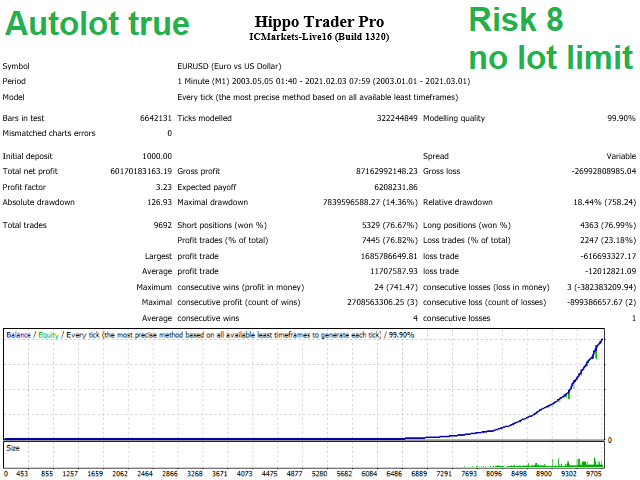
It works like a magic!
As a trader, I found this tool useful for spotting market trends and making informed decisions. The real-time data and clear chart patterns help identify potential trade opportunities.

INSTANT DOWNLOAD!
Original price: $399.00
Your Price: $19.00 95% OFF Retail!
Content: Expert: Hippo Trader Pro_3.1_fix.ex4 (Unlocked-Unlimited), NO MANUAL.

Hippo Trader Pro: Forex Trading Robot
Hippo Trader Pro is an advanced forex trading robot designed for trend-following strategies. It primarily trades during the Asian and European sessions, offering an efficient and effective approach for traders.
The EA has undergone stress tests over a 17-year period and consistently delivers a solid profit-to-drawdown ratio, making it a reliable choice for long-term trading.
Key Features:
-
Works on EURUSD M1: The robot is optimized for trading the EURUSD pair on a 1-minute timeframe.
-
Fifo Compliance: The EA is FIFO-compliant, which means it follows the First In, First Out method for order management (with the appropriate settings).
-
Trend Analysis: It analyzes the market without relying on outdated indicators and patterns. The system identifies the main trend by using volatility (ATR Filter) and Trend Patterns to predict future market movement.
-
High Accuracy: The backtest results show excellent payout rates and strong resilience against unexpected market fluctuations.
-
Relative Vigor Index (RVI): This indicator is used to identify the market trend and ensure accurate trade entries.
Backtest Recommendation:
-
Best to run backtests from 2003 to today to fully assess the performance of the EA.
If you’re unable to run a backtest yourself, we’ve provided a helpful video below.
Risk Management:
-
The default global stop loss is set at $1000 (or your base currency) for every 0.01 lot size. This adjusts automatically based on the risk.
Recommendations
| Symbol | EURUSD |
| Timeframe | M1 |
| Test From | 2003 |
| Settings | Default or set files |
| Brokers | Any |
| Minimum Deposit | 1000 usd, recommended 3k |
| Market Entry method | Market Order |
| Tester Method | tick by tick |
| Fifo Compliance | Yes with set file |
Settings Overview for Hippo Trader Pro V3.1
-
Lot: Set the lot size when auto-lot is disabled.
-
Autolot: Turn auto-lot on or off.
-
Sqrt Lot: Enable conservative auto-lot (based on square root).
-
Risk: Define risk for auto-lot calculation (not a percentage of capital).
-
Magic Number: Unique ID for identifying EA orders.
-
Spread Allowed: Set the max spread allowed before no trade will be opened.
-
Relative Vigor Index (RVI):
-
Periods: RVI oscillator periods.
-
Timeframe: Timeframe for RVI.
-
-
ATR Indicator:
-
Fast ATR Periods: ATR periods for the fast calculation.
-
Slow ATR Periods: ATR periods for the slow calculation.
-
Super Slow ATR Periods: ATR periods for super slow calculation.
-
ATR Timeframe: Timeframe for ATR.
-
-
Fixed Trading Hours: Set specific trading hours if different from the recommended ones.
-
Start Hour/Minute: Set your desired start time.
-
Stop Hour/Minute: Set your desired stop time.
-
-
Close Friday Night: Close trades when Friday ends.
-
Close Friday Hour: Set the hour to close trades on Friday.
-
-
Enable Trading on Specific Days: Choose whether to trade on specific days like Monday.
-
Enable Buy/Sell: Enable or disable buy and sell trades.
-
Allow Buy and Sell at Same Time: Allow simultaneous buy and sell trades if enabled.
-
-
Fifo Closing: Use FIFO (First In, First Out) order closing.
-
Max Orders: Limit the maximum number of open orders.
-
Coeff Sum: Adjust the position increase coefficient.
-
Minimum Distance: Set the minimum distance for secondary positions.
-
One Trade Bar Grid: Limit the robot to one trade per bar for grid orders.
-
Timeframe for Secondary Orders: Set the timeframe for secondary trades.
-
Take Profit: Set the take profit for orders.
-
Modify Take Profit for First Order: Use a different take profit for the first order.
-
Take Profit for First Order: Set take profit specifically for the first order.
-
-
Close Only End of Bar: Close trades only at the end of the M1 bar.
-
Enable Money Max Loss: Enable a limit on the maximum loss in money.
-
Every Microlot: Multiply the “money max loss” by 100 x lot size.
-
Stop Trading When Hit: Stop trading when the maximum loss is hit.
-
Maximum Monetary Loss: Set the maximum monetary loss.
-
-
Trade Comment: Add comments to your trades.
-
Enable Orders Counter: Display order counter in the comment.
-
Change Chart Color: Adjust the chart color.
-
Show Panel: Display the control panel.
-
Show Close Buttons: Show buttons to close trades.
-
Show Error: Display error messages.