


It works like a magic!
As a trader, I found this tool useful for spotting market trends and making informed decisions. The real-time data and clear chart patterns help identify potential trade opportunities.

INSTANT DOWNLOAD!
Original price: $2,400.00
Your price: $12.00 99.9% OFF Retail!
Content: Expert: Perceptrader AI v1.73_nodll.ex4 (Unlocked-Unlimited), Presets: 12, UserGuide.
Monitoring: https://www.mql5.com/en/signals/1919885?source=Unknown
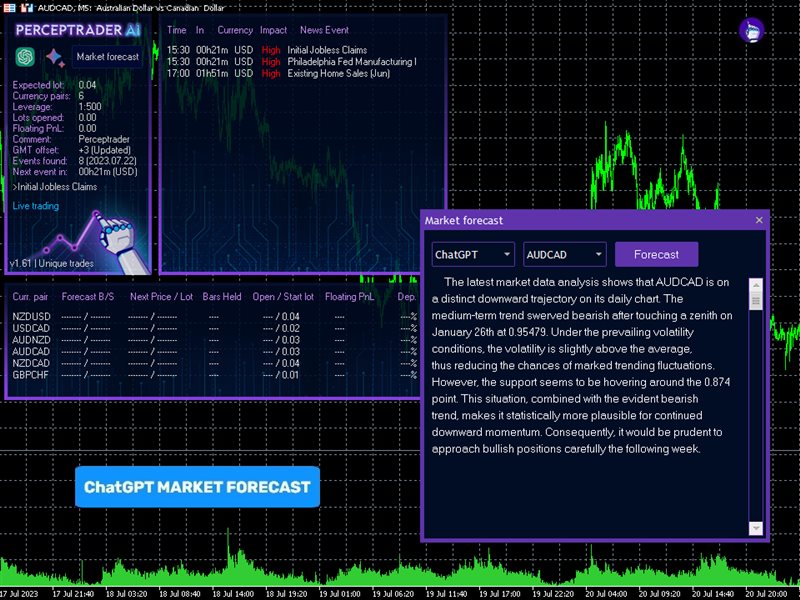
Perceptrader AI — Advanced Grid Trading EA Powered by Artificial Intelligence
Perceptrader AI is a state-of-the-art grid trading expert advisor that leverages Deep Learning and Artificial Neural Networks (ANN) to analyze vast market data in real-time. It identifies high-potential trade opportunities across multiple currency pairs, offering a smart, automated approach to grid trading.
Supported Pairs: NZDUSD, USDCAD, AUDNZD, AUDCAD, NZDCAD, GBPCHF
Timeframe: M5 (one chart setup, AUDCAD recommended)
Key Features:
-
AI-Driven Trade Filtering: Uses trend, momentum, and volatility filters based on deep learning to screen out low-potential trades.
-
Advanced News & Market Crash Filter: Automatically avoids trades during major news events and market crashes for safer trading.
-
Multi-Currency Support: Trade several pairs from one chart for simplicity and efficiency.
-
Automatic GMT Adjustment: Syncs with your broker’s server time to keep trading aligned.
-
Comprehensive Risk & Money Management: Flexible lot sizing methods including fixed, dynamic, deposit-based, and presets.
-
Robust Drawdown Controls: Multiple max drawdown limits and actions to protect your account.
-
Grid Trading Flexibility: Customize grid distance, max trades, multipliers, and smart distance adjustment based on volatility.
-
News Filter with Real-Time Economic Calendar Integration: Disables trading on bank holidays and during custom events for safer performance.
-
Machine Learning Filters: Incorporate ChatGPT and Google Bard forecasts for enhanced trade filtering (live trading only).
-
Self-Diagnostic and Forecast Indicators: Monitor EA status and AI predictions via an integrated statistics panel.
Installation & Usage:
-
Attach EA to a single M5 chart (preferably AUDCAD).
-
Update symbol names if your broker uses suffixes (e.g., AUDCAD.a).
-
Allow EA access to news and time servers for full functionality:
-
Recommended to run on a VPS for continuous trading.
-
Use an ECN broker for optimal performance.
Requirements & Recommendations:
-
Minimum deposit depends on leverage and risk settings (e.g., $1000 at 1:100 leverage).
-
Avoid using high-risk settings on accounts with less than $6000 if leverage is low (1:30).
-
EA is not sensitive to spread or slippage but works best with low-latency ECN accounts.
Expert Inputs & Settings Highlights:
-
Control opening of new trades and manual trading permissions.
-
Manage lots dynamically or fixed based on your balance or deposit load.
-
Set max lots per order and enable auto-splitting for large volumes.
-
Specify max spread, slippage, and number of simultaneous symbols.
-
Customize grid parameters including distance, pause times, max trades, and multipliers.
-
Enable trailing stops, break-even, and randomize order levels for stealth.
-
Set detailed trading hours and days.
-
Configure drawdown limits with automatic response actions.
-
Use machine learning filters for probability-based trade selection.
Risk Warning: Trading involves significant risk. Past performance does not guarantee future results. Use with proper risk management.
Custom News Filter Format:
-
Format:
Key[-Currency pair],Key[-Currency pair],.........,Key[-Currency pair] -
Key:
The currency of the news event or a keyword in the news header.-
You can combine multiple currencies in one key (e.g.,
USDAUDGBP). -
Case-insensitive for keywords (e.g.,
FOMC).
-
-
[-Currency pair] (optional):
Specifies which currency pair the rule applies to (e.g.,-EURUSD).
Examples:
-
USD,
Takes into account all news events for USD on all currency pairs. -
AUDGBP-GBPUSD-NZDUSD,
Takes into account all news events for AUD and GBP on GBPUSD and NZDUSD currency pairs. -
CHFEUR-EURUSD,
Takes into account all news events for CHF and EUR on the EURUSD currency pair. -
FOMC,
Takes into account news events with the word “FOMC” anywhere in the header on all currency pairs. -
Rate-AUDCAD
Takes into account news events with the word “Rate” in the header on AUDCAD currency pair.
Rules:
-
Each rule must be separated by a comma.
-
If
Disable Built-in News Filter Settingsisfalse, the custom rules are added to the built-in rules.
Additional News Filter Settings:
-
Medium Impact News: enable/disable news with medium impact (2 stars).
-
Low Impact News: enable/disable news with low impact (1 star).
-
Speaks: if
false, ignores news events marked as Speeches/Speaks. -
Wait Minutes Before Event: suspend trading before the news event.
-
Wait Minutes After Event: suspend trading after the news event.
-
Show News List: displays a list of upcoming news events on the info panel.
-
News List Refresh Rate: frequency of news list updates.
Stock Market Crash Filter Settings:
-
Stock Market Crash Filter Enabled: enable/disable this filter.
-
Stock Market Symbol: your broker’s S&P500 index symbol (e.g.,
US500,SPX500). -
Filter Period: period of the filter.
-
Max Historical Volatility (HV), %: max annualized std deviation of H1 returns.
-
Block Trading for the Entire Day: blocks new trades for the whole day if HV limit exceeded.
Additional Settings:
-
Trade Comment: comment added to orders.
-
UID (0…9): unique EA instance number (usually no change needed).
-
Show Panel: on/off info panel.
-
Show Stats: on/off statistics panel.
-
Font Size (1…8): font size of info panel.
Backtest Settings:
-
Disable Automatic GMT Detection: set to
trueto disable auto GMT detection. -
GMT Test/Manual: manual GMT offset in winter for Tester.
-
DST Test/Manual: DST setting for Tester.